

A localized product listing is not a translated one. It is a listing whose title, description, attributes, price, tax and delivery information all match what a shopper in that country searches for and what each channel accepts. For a store selling into Sweden, that means Swedish text, prices in SEK that include VAT, correct categories and identifiers, and one feed per channel and market that rebuilds itself when the catalogue changes. We built Textfinity to do exactly this: it maps, filters and publishes one feed per channel and market, rewrites titles and descriptions to each channel’s rules, and translates them into 25 European languages with a review step before anything reaches a feed.
This guide is for stores and agencies that already run, or are about to run, Google Shopping, Meta or price comparison feeds in more than one market. It uses Sweden as the worked example, because the rules are specific and easy to check.
TL;DR
- Translation changes the language. Localisation also changes search terms, spelling, sizes, currency, tax, shipping and returns information.
- For Sweden, Google expects Swedish product data, SEK prices and Swedish landing pages that match the feed. Mismatches can limit performance or lead to disapproval.
- Missing GTINs, categories and attributes make products invisible in filters and comparison tools, whatever the language of the text.
- Do the keyword research in Swedish rather than translating English keywords, then write titles and descriptions to each channel’s own limits.
- Keep one source catalogue and publish one localised feed per channel and market, with a human review step for AI text.
Table of Contents
- What localising a product listing really means
- What to localise in a Swedish listing and feed
- Titles and descriptions: writing for Swedish shoppers
- The technical requirements that decide whether a Swedish feed is accepted
- Fixing missing product data before you localise
- A workflow for localised feeds that stays maintainable
- Where Textfinity fits
- A short checklist before you switch on a Swedish feed
- FAQ
- Sources
What localising a product listing really means
Translation moves content from one language to another. Localisation goes further and modifies content so it appeals in a particular region. The UK government’s export guidance on localising an online marketplace separates the two and lists what to adapt: local search terms, brand-name fit, local spellings, seasonality, measurements and sizes, currency, shipping and returns, and taxes. It also warns that products which are not categorised and attributed correctly in the target market can become invisible in search results.
That last point is the one feed managers feel first. A perfectly written Swedish title attached to a wrong category or an empty colour field still loses impressions. Localisation is therefore a data job as much as a copywriting job.
What to localise in a Swedish listing and feed
Not every field needs the same attention. This table sorts the fields of a typical listing by what changes when you sell in Sweden.
| Field or element | What to change for Sweden | Why it matters |
|---|---|---|
| Title | Written in Swedish, with the key information first, using terms Swedes actually search | Drives matching and click-through |
| Description | Factual, practical Swedish, no word-for-word copy of the source language | Conversion, and consistency with the landing page |
| Price | SEK, including VAT (moms), matching the landing page | A mismatch can cause disapproval |
| Shipping and returns | Costs in SEK, delivery times, who pays return shipping | Shoppers compare these on the results page |
| Attributes | Colour, size, material in Swedish values; sizes in the local system | Filters and comparison tools depend on them |
| Identifiers | GTIN/EAN, brand, MPN | Needed for matching on Google and comparison engines |
| Category | Google product category and each marketplace’s own taxonomy | Wrong category, wrong audience |
| Landing page | Same language as the feed, same price, same variant | Google checks that the journey matches the data |
The bottom three rows are language-independent, which is why a store with a perfect translation can still struggle. Our guide to Google product category mapping covers the taxonomy side in detail.
Titles and descriptions: writing for Swedish shoppers
Start with Swedish keyword research
Do not translate your English keywords and hope. Swedish builds compounds that English spreads over several words, so a winter jacket for women may be searched as a single long word, and the term a shopper uses may differ from the literal translation. Brand and technology terms are often searched in English or in a mix, while everyday goods are searched in Swedish. The only reliable method is to check real Swedish queries for each product group.
Search quality also depends on how your own shop search handles synonyms and variants in another language. Merchants on Shopify will find a useful walkthrough of multilingual synonym problems in store search, which helps when deciding which Swedish terms to treat as equivalent.
Respect each channel’s limits
Channels do not agree on length. Google allows titles up to 150 characters and descriptions up to 5,000, according to its product data specification. Fyndiq, the Swedish marketplace, takes titles of 5 to 64 characters and plain-text descriptions of 10 to 4,096 characters, with no HTML markup. One Swedish title cannot serve both. You need a version per channel.
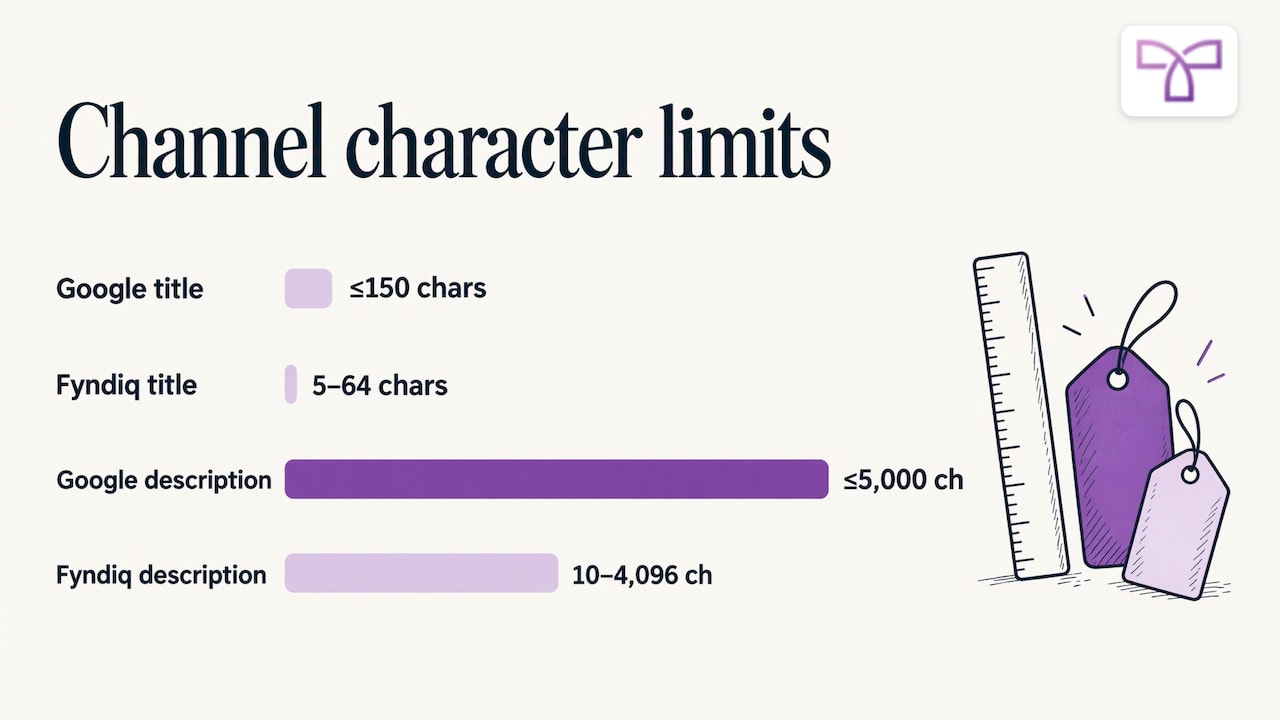
On Google, our own rule of thumb is a title of 100 to 150 characters with the key information in the first 70, since the end of a long title is often cut off on screen. Our guides on product title optimisation and the Google Shopping title template by category show the structures we use for different product types.
Tone and content
Swedish product copy tends to work best when it is plain and factual: what the product is, what it is made of, what it does, who it suits. Address the reader directly, avoid superlatives, and put the specifications where a shopper can compare them. Fyndiq’s own product page guidance points the same way: descriptions should explain value and use and give factual specifications, with transparent pricing, stock, delivery times and return conditions, including who pays return shipping and whether an item is refurbished or used.
For a longer treatment of the writing side, see our guide on how to translate product descriptions for every market.
The technical requirements that decide whether a Swedish feed is accepted
Google Shopping
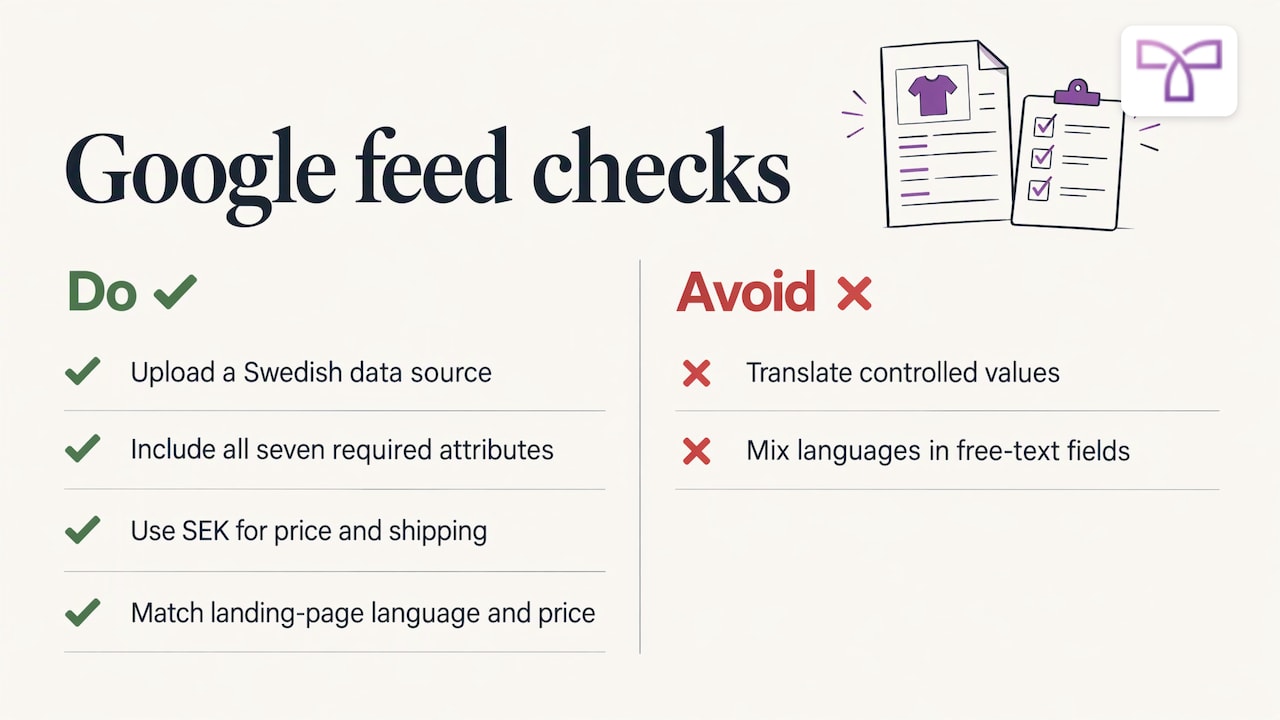
Google lists Swedish as a supported language for Shopping ads and free listings. Its supported languages and currencies page recommends full localisation: upload translated product data as a new data source in Swedish with SEK prices, submit shipping information in SEK, and keep landing pages in the same language as the product data. If key elements such as the title, description or variant information do not match the data source language, products may perform poorly or be disapproved.
The Swedish-language product data specification makes these attributes required: id, title, description, link, image link, availability and price. The price is numeric with an ISO 4217 currency code, for example 15.00 SEK, and outside the US and Canada it must include VAT.
Two details trip up multi-language stores. First, free-text attributes such as title and description should be in one language per data source, while attribute names and controlled values, for instance condition set to new, refurbished or used, stay in English. Translating those values by mistake is a common cause of errors after a bulk translation. Second, the price in the feed must match the price on the landing page, in the target country’s currency.
For Sweden, also check how your Shopping ads reach the results pages. In the EU and EEA, Google routes Shopping through comparison shopping services, which is something to confirm for your account when you set up each country. Our page on the Google Shopping feed for Sweden walks through SEK, Swedish text and Prisjakt in one place.
Google also changes its specification from time to time. Its 8 April 2025 update, for instance, stopped supporting the price attribute for deposits on instalment-priced products: you now use the downpayment sub-attribute of installment, and price holds the alternative price when paid in full upfront. If you sell on instalments, check your mapping against that change.
Fyndiq and comparison engines
Fyndiq’s integration documentation requires Swedish feeds to use market code SE, SEK, prices including all taxes, and a VAT percentage field limited to 6, 12 or 25 for Sweden. Those are three of the clearest examples of localisation as data: no amount of good Swedish copy fixes a feed with the wrong VAT value.
Fyndiq’s merchant help also states that a GTIN/EAN is needed for feeds to work properly with Google Shopping and comparison engines such as Prisjakt, and that correct category and attribute assignment, such as colour, size or waterproofing, is crucial for searching, filtering and recommendations. Products with missing or wrong attributes do not appear in filtered views or comparison tools.
Other channels
Meta, Microsoft and Amazon each have their own field names, limits and category systems. If you reuse the Google feed, map it rather than copy it. We cover these in Instagram Shopping catalogue feeds for Swedish stores, the Microsoft Shopping feed and the Amazon product feed. For neighbouring markets, see Google Shopping feeds for Denmark, Norway and Finland and the rules for Germany.
Fixing missing product data before you localise
Most stores that come to us for localisation have a second problem underneath: the source catalogue is thin. Shopify, WooCommerce and Magento exports often leave GTINs, brand, colour, size, material or gender empty, because the shop itself never needed them. Translating an empty field gives you an empty field in a second language.
A sensible order of work:
- Audit the source. Export the catalogue and count empty values for identifiers, brand, category and the attributes each product type needs. Electronics need energy labels and GTINs; apparel needs colour, size, gender and age group. Our electronics feed guide shows what that looks like in one vertical.
- Fill the gaps once, at the source. Add GTINs from supplier data, derive colour and size from titles or variants, and assign categories by rule instead of by hand.
- Map to each channel’s taxonomy. One store category can become a different Google category, a Fyndiq category and a Meta product type.
- Only then localise the text. Titles written from complete attributes are better titles, because the key information is actually available to put first.
Our feed optimisation checklist puts these fixes in order of impact.
A workflow for localised feeds that stays maintainable
Localisation fails in practice when it is a one-off spreadsheet. Prices, stock and variants change daily, and a Swedish copy made in March is wrong by April. The pattern that holds up is a single source catalogue with a separate output per channel and market.
- Connect one source. Shopify, WooCommerce, Magento, PrestaShop, BigCommerce, a CSV, TSV or Google Shopping XML file, or a Google Sheet. Textfinity reads all of these.
- Define the market. For Sweden: language Swedish, currency SEK, VAT included, Swedish shipping and returns.
- Filter what belongs in the market. Remove products you do not ship to Sweden, or that a channel does not allow.
- Rewrite and translate with rules per channel. Our AI configs rewrite titles and descriptions to each channel’s rules and translate into 25 European languages. Every proposal goes through a review step before it reaches a feed, so someone who knows the market can approve the wording.
- Publish to a stable URL. Each feed is published to a URL that rebuilds on a schedule, so the channel always fetches current prices and stock.
- Validate in the channel. Check diagnostics in Merchant Center and the other consoles, fix the cause in the source or the rules, and let the next rebuild apply it everywhere.
For agencies, the same logic applies per client: one set-up per store, one output per market. See feed management for agencies for how that is organised. For a general view of the process, our product feed management guide covers workflow, channels and scheduling, and the feed software criteria page lists what to look for in a tool.
Where Textfinity fits
If the work above sounds like a lot for a small team, that is what the tool and the set-up service are for. Plans start at $4.99 a month for multi-channel publishing, and AI content starts at $9.99 a month. The full list, from the Free plan to Premium at $14.99 a month, is on the pricing section; yearly billing is $49.90 for Basic, $99.90 for Standard and $149.90 for Premium.
If you would rather not configure it yourself, have us set it up: you send the store and the channels, and we connect the catalogue, build the feeds and register them with you in each channel’s console. Processing runs on German infrastructure and the AI models are pinned to EU-hosted endpoints, so product data stays in the EU, which many European stores want to be able to state to their customers.
A short checklist before you switch on a Swedish feed
- Titles and descriptions are in Swedish, written to each channel’s length limits.
- Prices are in SEK, include VAT and match the landing page exactly.
- Controlled values such as condition are in the form the channel requires, not translated.
- Every product has a GTIN where one exists, a brand, a category and the attributes its type needs.
- Shipping and return information is in SEK and in Swedish, with who pays return shipping stated.
- Landing pages are in Swedish and show the same variant and price as the feed.
- The feed has a stable URL and a rebuild schedule, and diagnostics are checked after the first fetch.
FAQ
What is the difference between a translated and a localized product listing?
A translated listing carries the same content in another language. A localized listing also adapts search terms, spellings, sizes, currency, tax, shipping and returns information to the target market. Government export guidance treats these as separate steps, and localisation is the one that makes products findable.
Do I need a separate feed for each country?
In practice yes. Google recommends uploading translated product data as its own data source in the target language with prices and shipping in the local currency. Each channel also has its own fields and limits, so a feed per channel and market is the cleanest set-up. Textfinity publishes one feed per channel and market from the same source catalogue.
Which Swedish listing details cause disapprovals most often?
The usual causes are prices that differ from the landing page, prices without VAT, a feed language that does not match the landing page, and missing required attributes such as availability or image link. Translated controlled values, such as condition, are another common source of errors.
Can AI localise a whole catalogue safely?
Yes, when it works from complete product data and every proposal is reviewed before publishing. In Textfinity, AI configs rewrite and translate titles and descriptions to each channel’s rules, and nothing reaches a feed until the review step has been done.
How long should a Swedish product title be?
That depends on the channel. Google accepts up to 150 characters, and we write Google titles at 100 to 150 characters with the key information in the first 70. Fyndiq limits titles to 64 characters, so it needs a shorter version.
Sources
- How to localise your online market place, business.gov.uk
- Supported languages and currencies, Google Merchant Center Help
- Produktdataspecifikation, Google Merchant Center Hjälp
- Especificación de datos de producto, Ayuda de Google Merchant Center
- Merchant Center announcements change log
- Quick Start Integration, Fyndiq Documentation
- Product Detail Page Guidelines, Fyndiq Merchant Help Center
- When Shopify multilingual synonyms break for merchants